

On October 21, 2026, the PHP team shipped an emergency security release. It fixes two critical flaws that let an attacker run code on your server without logging in. Attacks started before the patch even came out. If your site, shop, or app runs on PHP, you need to act today.
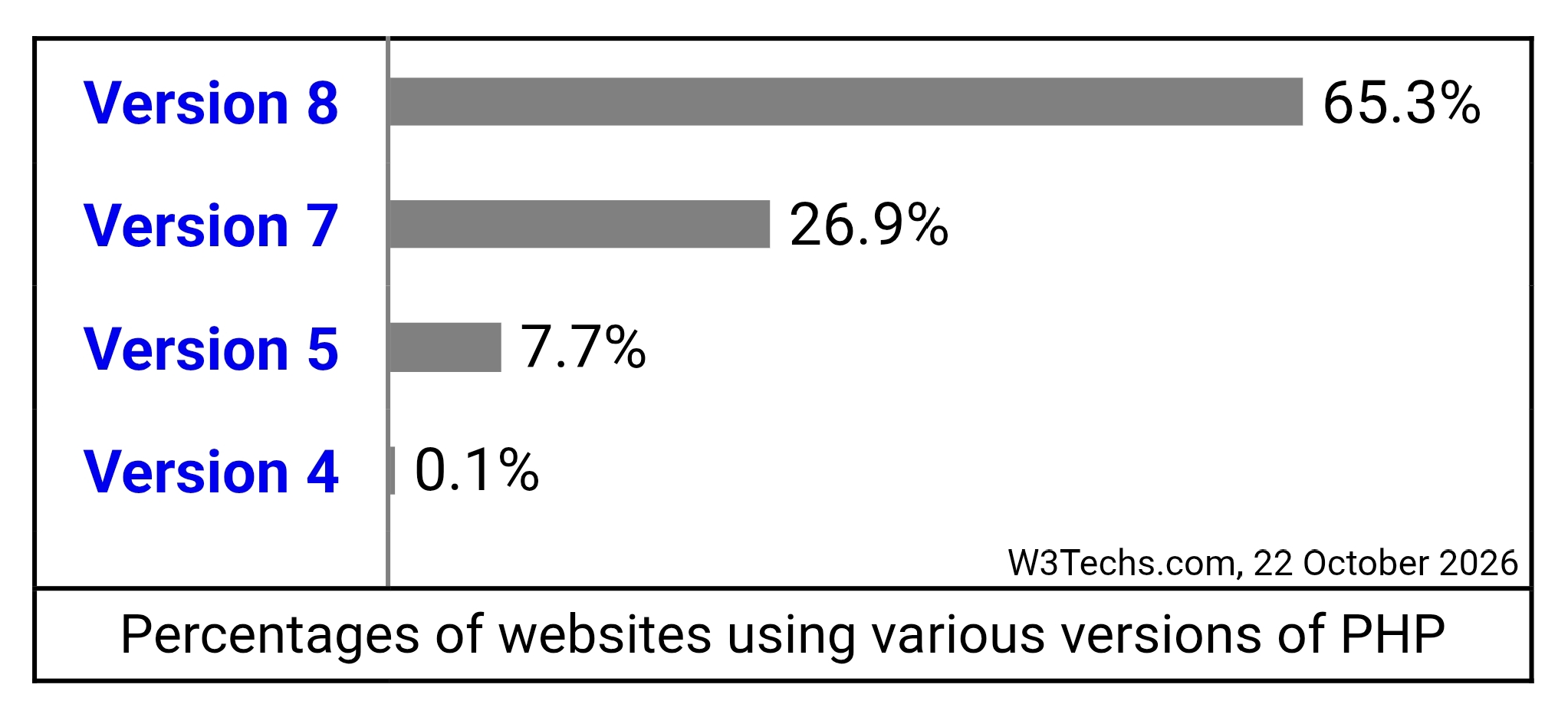
PHP is not a niche tool. According to W3Techs, it runs on 69.3% of all websites whose server-side language is known. That is why this one matters so much.
The quick answer
- What it is: two flaws in PHP itself, CVE-2026-109618 and CVE-2026-109619. Both score 9.2 out of 10. Together they are nicknamed PHP2Shell.
- What they allow: remote code execution with no login.
- Who is exposed: any PHP setup that serves web requests, from PHP 5.4 through 8.5.11, according to Wiz. That includes WordPress and Laravel sites.
- The fix: update to PHP 8.5.12, 8.4.27, 8.3.36 or 8.2.35, or your distribution's patched package. Then restart PHP.
- Is it being used? Yes. Cloudflare, watchTowr and Patchstack all report attacks in the wild.
The US cyber agency CISA has also published an alert urging immediate patching.
What happened, hour by hour
| When | What happened |
|---|---|
| October 20 | PHP announced an out-of-band release for the next day. Details leaked early. |
| October 21, 03:02 UTC | Cloudflare's firewall began blocking exploit attempts. |
| October 21, morning | Hosting companies reported active attacks. Cloudflare's CTO confirmed early attacks. |
| October 21, 14:00 UTC | PHP released 8.5.12, 8.4.27, 8.3.36 and 8.2.35. |
| October 21 and after | CISA issued its alert. watchTowr saw exploitation on its honeypots. |
Cloudflare credits researchers from Calif.io, Wiz, OpenAI and Quarkslab with the disclosure. The key point for you is simple. The gap between the leak and the patch gave attackers a head start.
What the two flaws actually are
I will skip the deep memory theory. Here is the plain version.
CVE-2026-109618 is about running out of memory. When PHP runs out, it abandons the current request in a rough way. That can leave some request data half set up. Cleanup then treats that broken data as if it were fine.
CVE-2026-109619 is about leftovers. PHP can keep a pointer to memory that belongs to one request, even after that memory is freed. A later request handled by the same worker may then use that stale pointer.
Think of a worker as a clerk who handles one customer after another. In the first flaw, the clerk drops a form halfway. In the second, the clerk keeps a note from the last customer. An attacker who plans around these slips can steer the clerk into running their instructions.
One more detail matters. These bugs live below WordPress, Laravel, your plugins, and your theme. So updating your app does nothing here. The WordPress project has said no WordPress update is planned. The fix is PHP.
These vulnerabilities are not specific to WordPress and affect any server that hosts a PHP application. No WordPress update is required or planned for these issues
WordPress
Who needs to act
Managed hosting. Your host patches PHP for you. Check their status page or email. Codeable keeps a running list of what major hosts have said.
Shared hosting. The host patches the servers. Ask support to confirm they applied the October 21 release, especially if you chose an older PHP version in your control panel.
Login to your cPanel, select PHP version selector and apply latest version.

A VPS you manage. Nobody will patch it for you. This is the group that has to move today, and it is the group this site is written for. The rest of this guide is for you.
Step 1: Find out what you are running
Start with the version PHP reports:
php -vHere is the catch. On Ubuntu and Debian, the fixed package keeps its old version number. A patched Ubuntu 24.04 server still says 8.3.6. So the number alone can mislead you. Check the package version instead:
dpkg -s php8.3-fpm | grep '^Version'Then compare it with this table. These fixed builds come from Mattias Geniar's patch guide and this Ubuntu walkthrough.
| System | PHP package | Fixed version |
|---|---|---|
| Ubuntu 26.04 | php8.5 | 8.5.4-0ubuntu1.5 |
| Ubuntu 24.04 | php8.3 | 8.3.6-0ubuntu0.24.04.13 |
| Ubuntu 22.04 | php8.1 | 8.1.2-1ubuntu2.28 |
| Debian 13 | php8.4 | 8.4.27-1~deb13u1 |
| Debian 12 | php8.2 | 8.2.35-1~deb12u1 |
| Ondrej PPA or upstream builds | any | 8.5.12, 8.4.27, 8.3.36 or 8.2.35 |
You can also search the changelog for the CVE number. If it shows up, the fix is in:
apt changelog php8.3-fpm | grep -m1 'CVE-2026-10961'Step 2: Install the update
Swap 8.3 for the PHP version you use:
sudo apt update
sudo apt install --only-upgrade 'php8.3*'
On Rocky or AlmaLinux, ask the package manager directly:
dnf updateinfo list --cve CVE-2026-109618Before a big upgrade, take a database backup. Our MySQL to R2 backup guide covers it. A patch rarely breaks anything, but a fresh backup costs you two minutes.
Step 3: Restart everything that runs PHP
This step is easy to forget, and it is not optional. Workers that were already running keep using the old, vulnerable code until they restart.
sudo systemctl restart php8.3-fpm
sudo systemctl restart apache2
Only restart Apache if you use it. If you run queue workers, restart those too. Our Supervisor guide for Laravel queue workers shows how.
sudo supervisorctl restart laravel-worker:*Apache with mod_php deserves extra urgency. Codeable reports that PHP rates the risk highest there, because an attacker can reach the flaw before your application even loads.
Step 4: Confirm the fix landed
Check that the package version matches the table. Then check that the service really restarted after the update:
ps -o lstart= -C php-fpm8.3The start time should be after you installed the update. If it is older, the old process is still running.
Running PHP in Docker?
Your host's patch does not touch your containers. Each image carries its own PHP. Pull a fresh base image and rebuild:
docker compose build --pull --no-cache
docker compose up -d
Then check the version inside the container. Do not assume the tag is fixed. Official image tags can lag behind a release by hours. If your tag still reports an old version, wait for the rebuilt image or use a distribution-patched base. If you followed our Docker and Caddy guide, this applies to every app container on the box.
If you truly cannot patch yet
PHP is clear on this. There is no complete workaround, and updating is the only safe choice. The steps below only close specific attack paths. Use them to buy a few hours, not to stay unpatched.
One documented step turns off upload progress tracking:
echo "session.upload_progress.enabled = 0" | sudo tee /etc/php/8.3/fpm/conf.d/99-php2shell.ini
sudo systemctl restart php8.3-fpm
php-fpm8.3 -i | grep -i 'session.upload_progress.enabled'
On PHP 8.5 only, hosts such as InMotion also switched off fatal error backtraces. Add fatal_error_backtraces = Off to the same file. WordPress does not rely on either feature, so a typical site should not notice.
If even that is not possible, think about taking the site offline. European cyber agency CERT-EU suggests isolating internet-facing apps from the public network until the fix is verified, as noted in Tenable's FAQ.
Does Cloudflare protect me?
Partly. Cloudflare switched on firewall rules for these flaws on every plan that includes its WAF, free plan included. That is good news for small sites. On paid plans, check that the managed ruleset is set to block, not just log.

But Cloudflare itself calls these rules a stopgap. There are three limits to know:
- They only cover traffic that passes through Cloudflare. A record that is not proxied (grey cloud) gets no protection.
- Anyone who finds your server's real IP can attack it directly and skip the firewall.
- Cloudflare reports that attackers are already changing their payloads to dodge the rules.
So use Cloudflare as a layer, never as the fix. To close the direct-to-server gap, allow web traffic only from Cloudflare's published IP ranges. Our UFW guide shows how to add rules without locking yourself out. If you run containers, read why Docker can bypass UFW first, or your new rules may not apply.
Staging sites run PHP too, and they are often forgotten. Put them behind Cloudflare Access so strangers cannot reach them at all.
How to check if you were hit
I cannot promise a clean bill of health from a few commands. These checks only catch the obvious signs. Still, they are worth running, especially if your server was online on October 21.
find /var/www -type f -name "*.php" -mtime -3 -ls
sudo ls -la /etc/cron.d
crontab -l
The first command lists PHP files changed in the last three days. Look for names or locations you do not recognize. The other two show scheduled jobs you did not create.
On WordPress, WP-CLI can compare your files with the official copies:
wp core verify-checksums
wp plugin verify-checksums --all
wp user list --role=administrator
If anything looks wrong, do not clean it by hand. Patch PHP first. Then restore from a backup you know is good, and rotate your secrets, including database passwords and the keys in your .env file. This is also why we keep pushing restore-tested backups. A backup you have never restored is only a guess.
What if you run PHP 8.1 or older?
PHP only released fixes for 8.2, 8.3, 8.4 and 8.5. For older branches, you depend on your distribution. Ubuntu 22.04 has a free fix for php8.1. Ubuntu 20.04 and older need Ubuntu Pro. Debian 11 has no free fix, since its long-term support ended on August 31, 2026, according to Geniar's guide. PHP also left minimal source patches for 7.4, 8.0 and 8.1 for people who build PHP themselves.
For most people, the real answer is to move to a supported PHP version. Test the upgrade on a staging copy first. Our post on PHP 8.4 deprecation warnings in WordPress will help you spot plugin problems before they reach your live site.
Frequently asked questions
Do I need to update WordPress or Laravel? No. The WordPress project says no WordPress update is planned, and Laravel's notice points to the PHP update alone. Updating plugins will not fix this. Laravel Forge users can switch PHP versions from the server dashboard, per Laravel's security notice.
Is php -v enough to prove I am safe? No. Debian and Ubuntu backport the fix without changing the version number. Check the package version or the changelog, as shown above. Also remember that the command line and your web server can use different PHP builds.
Are command line scripts affected? The attacks described so far reach PHP through web requests. Cron scripts are not what attackers hit over the web. But it is the same package, so you fix both with one update.
Is this being exploited right now? Yes, according to Cloudflare, watchTowr, and hosting partners quoted by Patchstack. Treat any unpatched server as a target.
Where do I read the official details? Start with the release notes for PHP 8.5.12 and PHP 8.4.27. For quick Q&A, the watchTowr FAQ and Tenable FAQ are clear. Cloudflare's official X account, @Cloudflare, is also worth following for rule updates.
My order of work
If you only have ten minutes, do it in this order. First, update PHP. Second, restart PHP and every worker. Third, rebuild any Docker images. Fourth, check that your origin only accepts Cloudflare traffic. Fifth, scan for signs of a break-in. That order closes the biggest hole first.
We have covered PHP security here before, including the Composer token leak and the WordPress backup plugin flaw. This one is bigger than both, because it sits under everything else. Patch it, restart it, and verify it.
I checked version numbers, fixed packages and dates against PHP's release pages and the vendor sources linked above as of October 23, 2026. Package builds and host statuses change by the hour, so confirm with your own provider.

Comments 0
Be the first to comment.
Leave a comment