


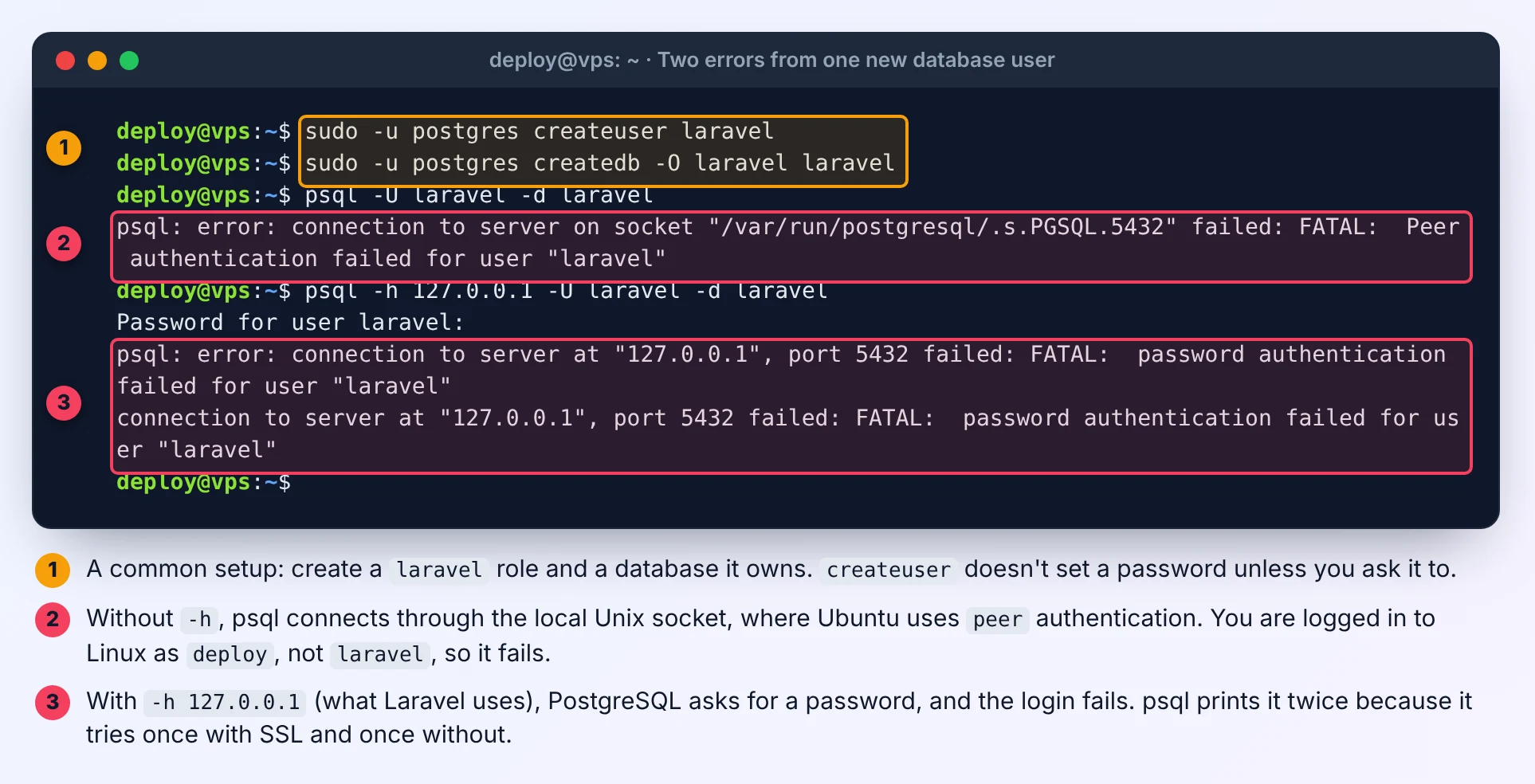
You install PostgreSQL on an Ubuntu VPS, create a database user for your Laravel app, and the first login fails. From the command line:
psql: error: connection to server on socket "/var/run/postgresql/.s.PGSQL.5432" failed: FATAL: Peer authentication failed for user "laravel"And from your app, or with psql -h 127.0.0.1:
FATAL: password authentication failed for user "laravel"They look like the same problem, but they're two different rules in PostgreSQL's access file, and each has its own fix. I reproduced both on Ubuntu 24.04 with its PostgreSQL 16 package, and every screenshot below is from that test server.
Why one database user gets two different errors
PostgreSQL decides how you must prove who you are from pg_hba.conf, read top to bottom, first match wins. Ubuntu ships these rules:
sudo grep -vE '^\s*(#|$)' /etc/postgresql/16/main/pg_hba.conflocal all postgres peer
local all all peer
host all all 127.0.0.1/32 scram-sha-256
host all all ::1/128 scram-sha-256local+peer: connections through the Unix socket, which is whatpsqluses when you don't pass-h. PostgreSQL asks the operating system who you are and only lets you in as the database user with the same name. That's whysudo -u postgres psqlworks, whilepsql -U laravelrun as yourdeployuser fails.host127.0.0.1 +scram-sha-256: TCP connections from the server itself need a password. This is the rule your Laravel app hits withDB_HOST=127.0.0.1, and also withDB_HOST=localhost, which connects over TCP too.
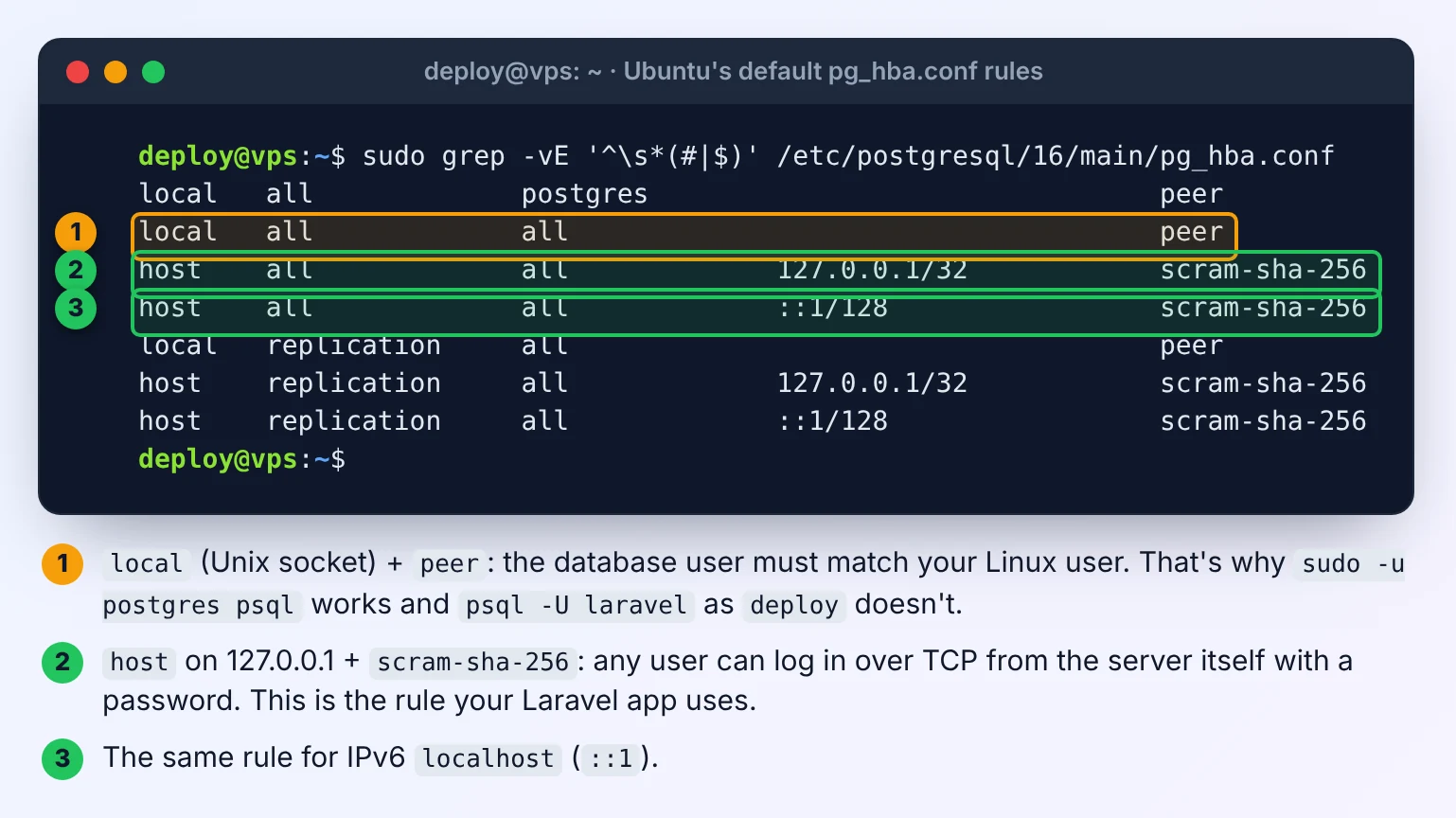
So "Peer authentication failed" usually just means you tested from the wrong place, and "password authentication failed" is the one your app actually cares about.
Read the PostgreSQL log: it names the real reason
Your app only ever sees the short error. The server log has a DETAIL line with the reason:
sudo tail -n 20 /var/log/postgresql/postgresql-16-main.log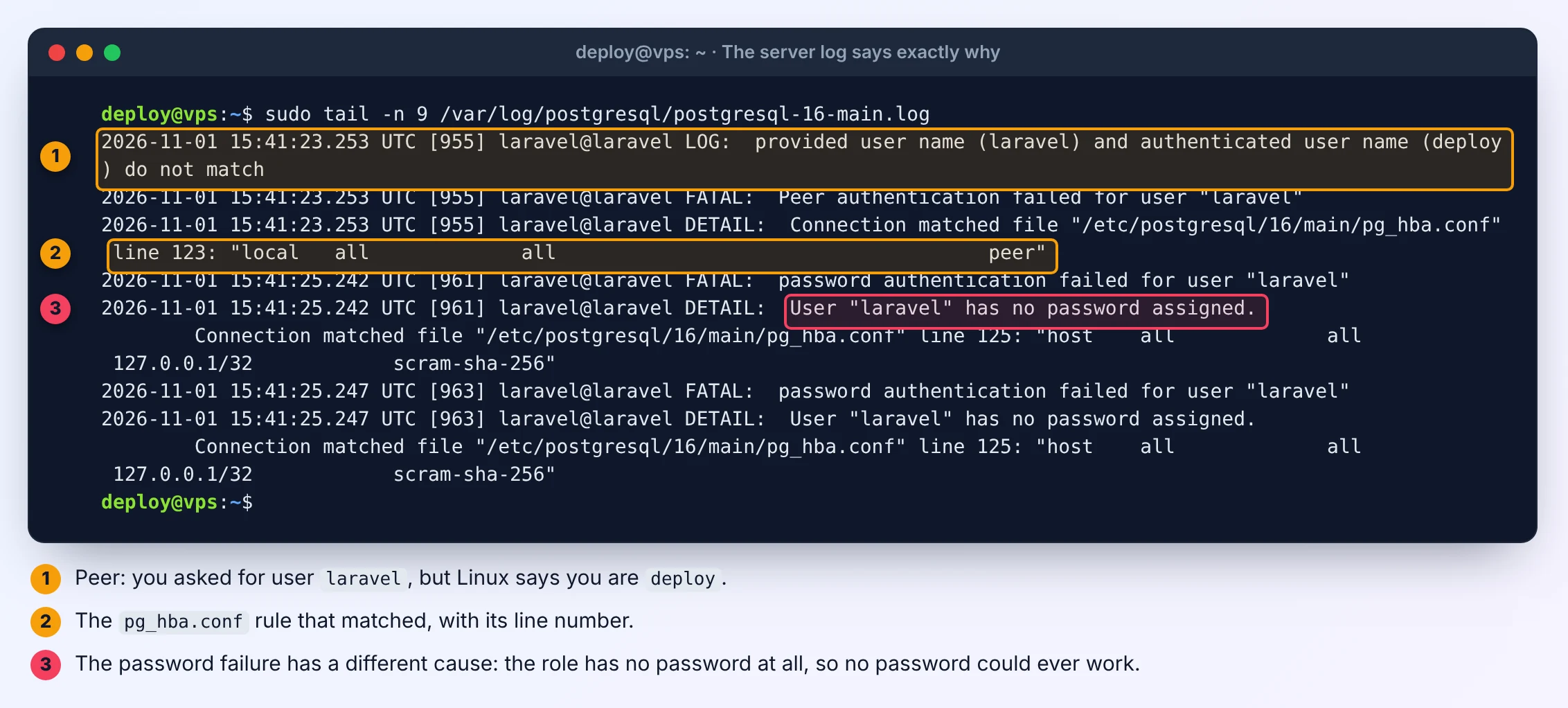
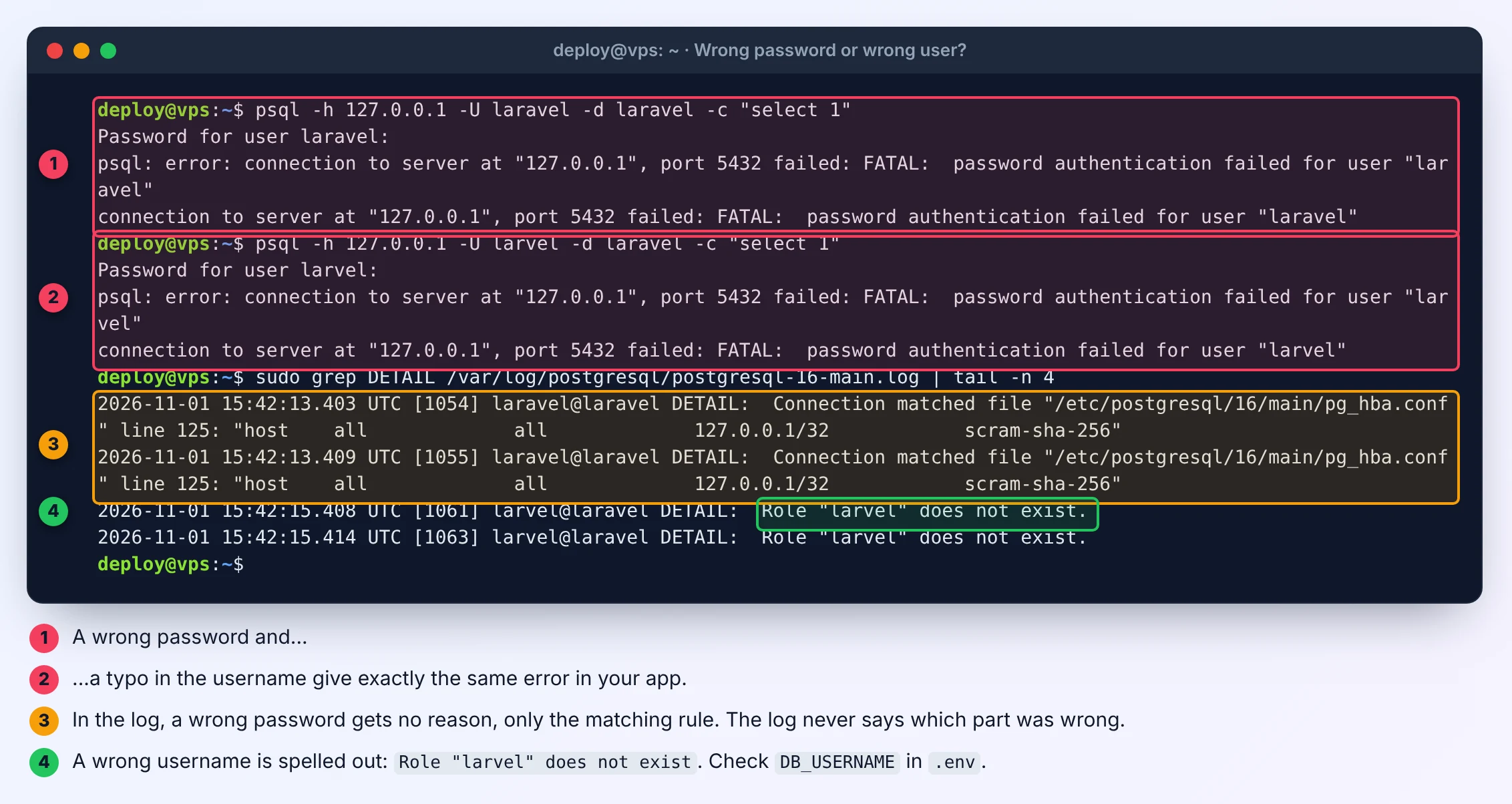
What I saw for each case:
- Peer:
provided user name (laravel) and authenticated user name (deploy) do not match. - The role has no password:
DETAIL: User "laravel" has no password assigned.This is very common, becausecreateuser laraveldoesn't set one unless you ask. - Typo in the username:
DETAIL: Role "larvel" does not exist. - Wrong password: no reason at all, only
Connection matched file ... line 125. If the log names the matching rule and nothing else, the password itself is wrong.
Every line also shows which pg_hba.conf rule matched, with its line number, so you never have to guess which rule applied.
Fix: give the role a password and connect over TCP
Set the password at a prompt, so it doesn't land in your shell history:
sudo -u postgres psql -c '\password laravel'Then test exactly the way Laravel connects:
psql -h 127.0.0.1 -U laravel -d laravel -c 'select current_user, current_database();'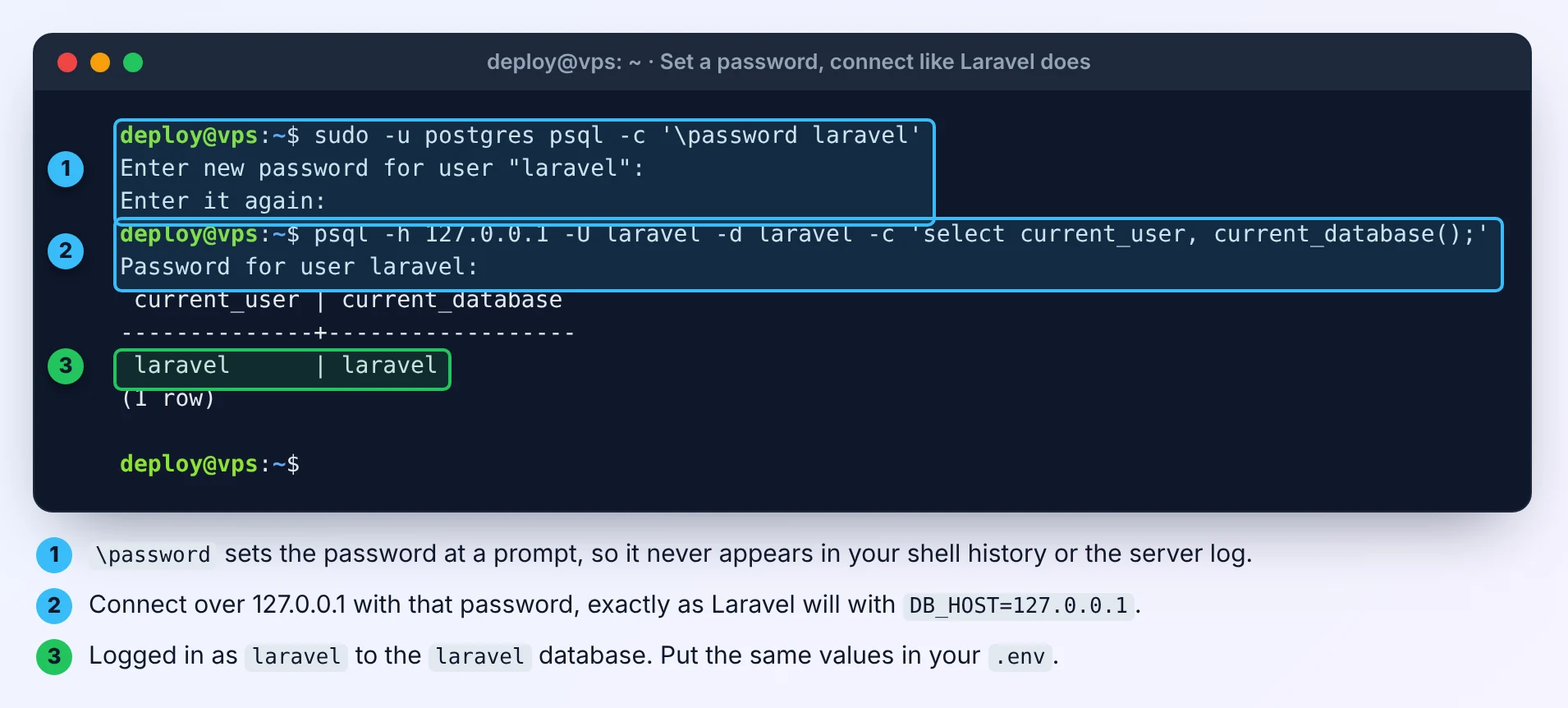
If that prints laravel | laravel, use the same values in .env:
DB_CONNECTION=pgsql
DB_HOST=127.0.0.1
DB_PORT=5432
DB_DATABASE=laravel
DB_USERNAME=laravel
DB_PASSWORD=the-password-you-set
Clear the cached config afterwards with php artisan config:clear, or your app keeps using the old values.
Creating the user from scratch? Do it in one step, so it has a password from the start:
sudo -u postgres createuser --pwprompt laravel
sudo -u postgres createdb -O laravel laravel
What not to change
Don't "fix" this by changing peer or scram-sha-256 to trust in pg_hba.conf. trust lets anyone who can reach that rule log in as any user, including postgres, with no password. Ubuntu's defaults are already right for a single-server app: socket logins for admins with sudo -u postgres, and passwords for apps over 127.0.0.1.
If you do edit pg_hba.conf, reload PostgreSQL so it reads the file again:
sudo systemctl reload postgresqlA related error: "no pg_hba.conf entry for host"
If the message is no pg_hba.conf entry for host "172.18.0.2", PostgreSQL didn't even get to checking the password: no rule matches where the connection comes from. That's typical when Laravel runs in Docker and PostgreSQL runs on the host, because the container connects from a Docker network address, not 127.0.0.1. Our guide to SQLSTATE[HY000] [2002] connection refused in Laravel and Docker covers the same host-versus-container mix-up from the networking side. You need a host rule for that network and PostgreSQL listening on it, and you should keep port 5432 closed to the internet. Our Open Port Checker shows whether 5432 is reachable from outside: its "Exposed databases and admin services" option checks it along with other database ports.
Reproduced on Ubuntu 24.04 with PostgreSQL 16.15 in November 2026. On other PostgreSQL versions, the version number in the paths changes, for example /etc/postgresql/17/main/.



Comments 0
Be the first to comment.
Leave a comment