

One minute your WordPress or Laravel site is fine, the next it throws errors or crawls, and the logs are full of this:
MISCONF Redis is configured to save RDB snapshots, but it's currently unable to persist to disk. Commands that may modify the data set are disabled, because this instance is configured to report errors during writes if RDB snapshotting fails (stop-writes-on-bgsave-error option). Please check the Redis logs for details about the RDB error.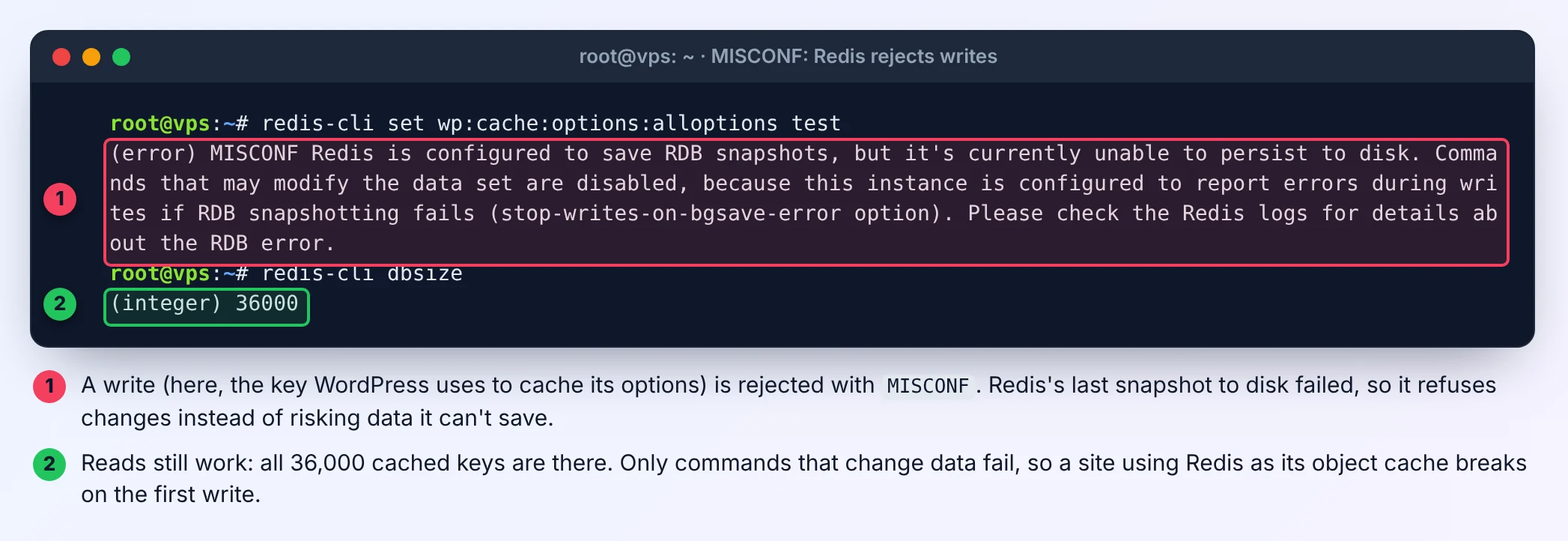
Redis hasn't crashed. It saves a copy of its data to disk from time to time (an RDB snapshot), and the last one failed. With the default setting stop-writes-on-bgsave-error yes, Redis then refuses every command that changes data, so you notice the problem instead of silently losing data later. Reads keep working, which is why the site half-works.
The message tells you what happened, not why. The why is in the Redis log, and on a VPS it is almost always one of three things: a full disk, wrong permissions on the data folder, or not enough memory to start the save. I reproduced the first two on an Ubuntu 24.04 test server with Redis 7.0.15, the version Ubuntu ships, and the screenshots below are from those runs.
Step 1: confirm the last save failed
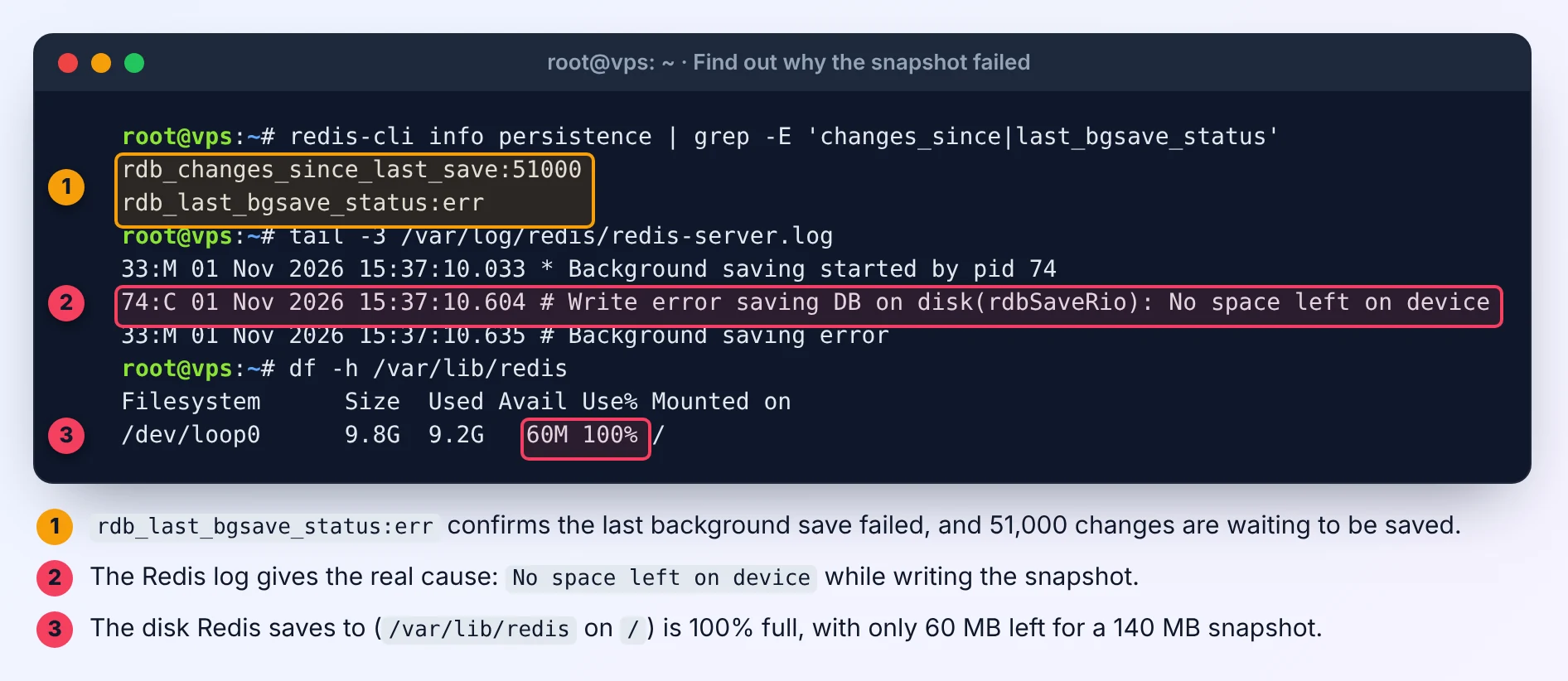
redis-cli info persistence | grep -E 'changes_since|last_bgsave_status'rdb_last_bgsave_status:err confirms it. rdb_changes_since_last_save shows how many writes are waiting to be saved.
Step 2: read the Redis log
sudo tail -n 20 /var/log/redis/redis-server.logThat's the default log location on Ubuntu and Debian. If it's empty, check sudo journalctl -u redis-server -n 50. Look for the line just before Background saving error. It names the cause.
Cause 1: the disk is full
The log says:
# Write error saving DB on disk(rdbSaveRio): No space left on device
# Background saving error
Confirm it on the disk Redis writes to:
df -h /var/lib/redisRedis needs room for a whole new snapshot, not just the changes: it writes a temporary file and only replaces the old one when the new one is complete. With 140 MB of data and 60 MB free, it can never succeed.
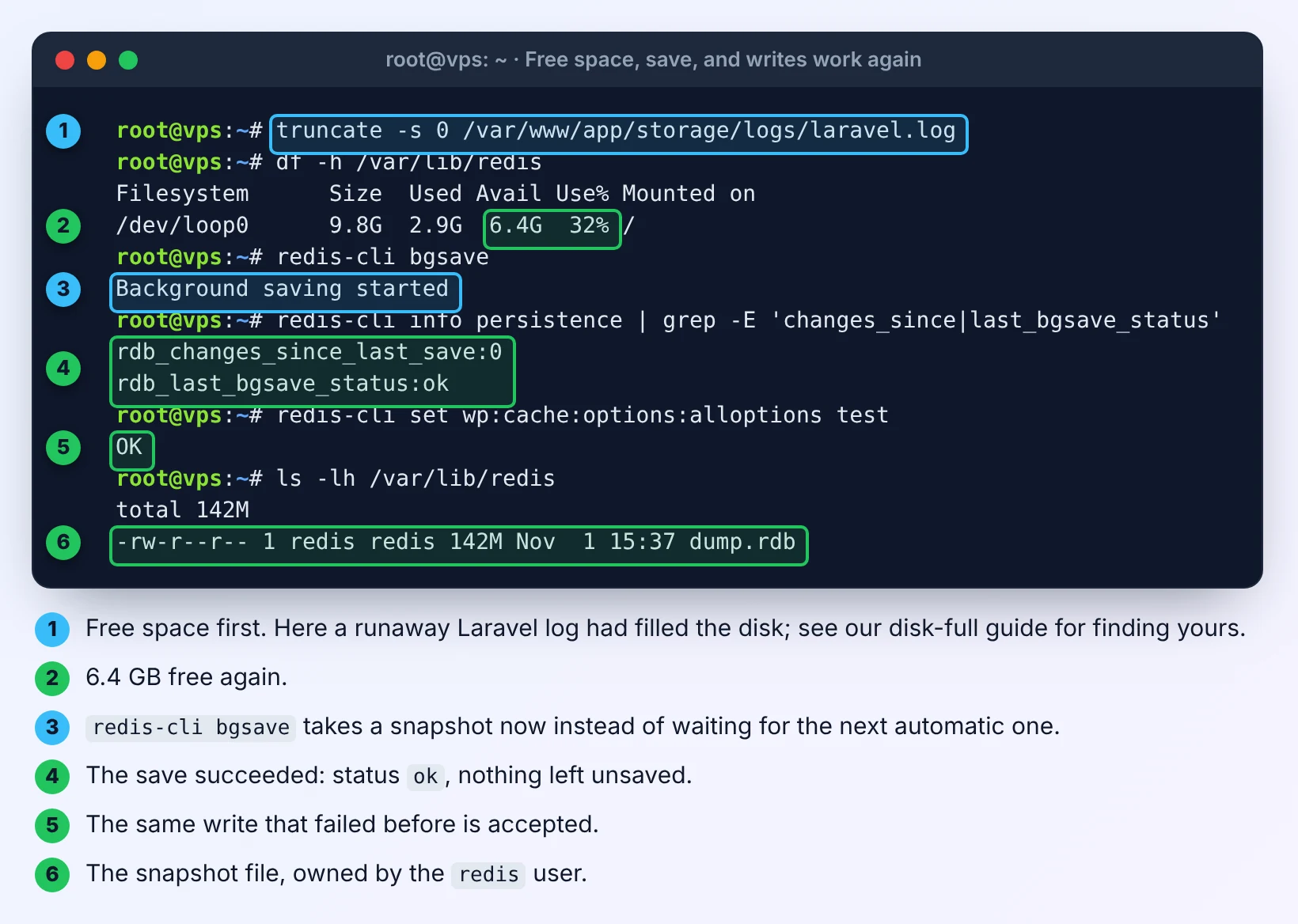
Free some space (our guide to finding what filled a VPS disk walks through the usual culprits), then ask Redis to save straight away instead of waiting for its next scheduled snapshot:
redis-cli bgsave
redis-cli info persistence | grep -E 'changes_since|last_bgsave_status'
Once the status is ok, writes are accepted again. There's no need to restart Redis.
Cause 2: Redis can't write to its own folder
Same error in your app, different line in the log:
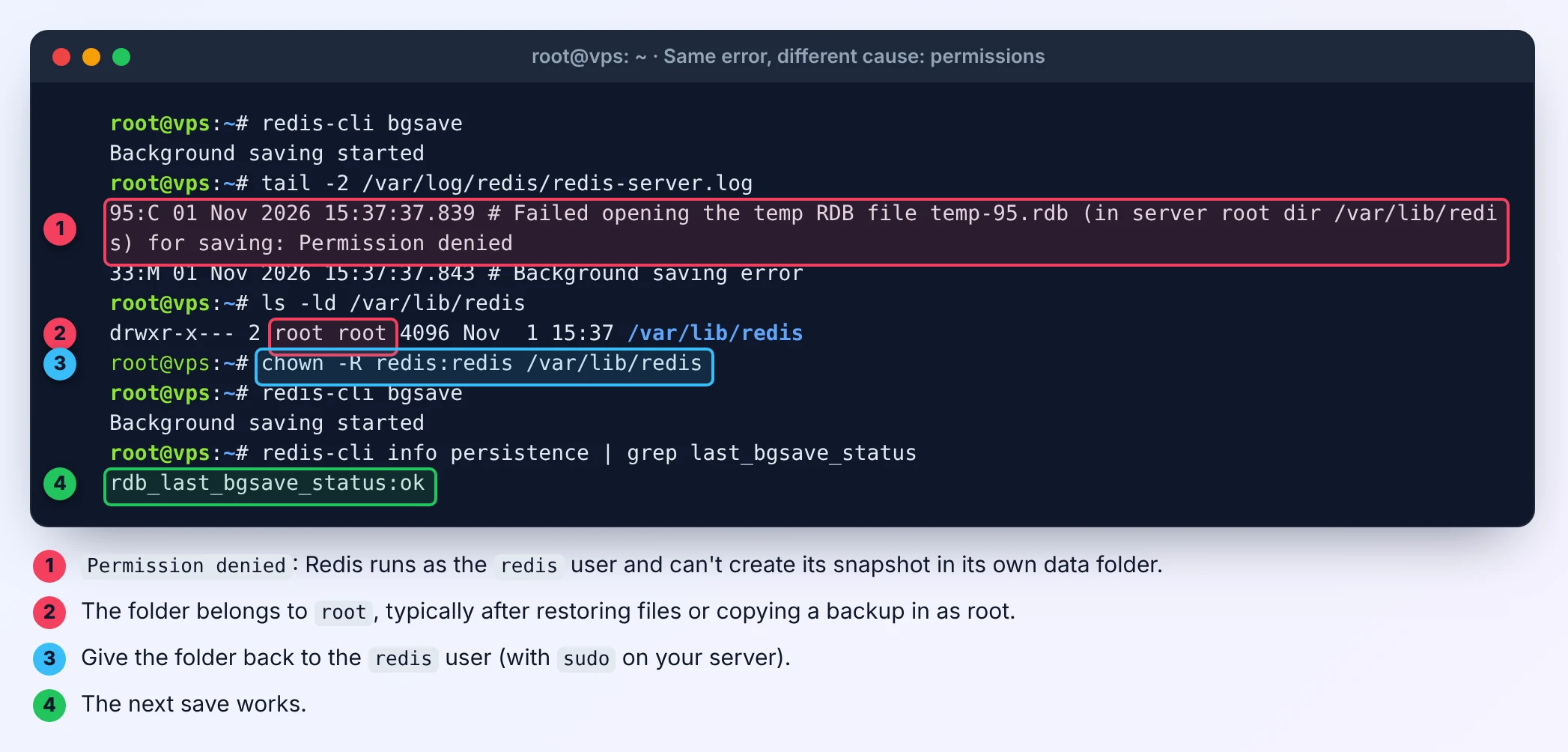
# Failed opening the temp RDB file temp-95.rdb (in server root dir /var/lib/redis) for saving: Permission deniedRedis runs as the redis user. If /var/lib/redis (or the folder set by dir in redis.conf) belongs to someone else, it can't create the snapshot. This usually happens after restoring files as root, moving the data folder, or a configuration tool changing ownership.
ls -ld /var/lib/redis
sudo chown -R redis:redis /var/lib/redis
redis-cli bgsave
If you moved the data folder, check the path Redis is really using with redis-cli config get dir.
Cause 3: not enough memory to start the save
To snapshot without pausing, Redis forks a copy of itself. On a small VPS with little free memory, that fork can fail. The log then shows Can't save in background: fork: Cannot allocate memory. Redis warns about this every time it starts:
WARNING Memory overcommit must be enabled! Without it, a background save or replication may fail under low memory condition.If you see that warning in your log, do what it says:
echo 'vm.overcommit_memory = 1' | sudo tee /etc/sysctl.d/99-redis.conf
sudo sysctl vm.overcommit_memory=1
Also make sure Redis has a memory limit and the VPS has some swap, so a save can't push it over the edge. See our guides to capping Redis memory and setting up swap.
If Redis is only a cache, you can turn snapshots off
A WordPress object cache, or a Laravel cache that only holds data your app can rebuild from the database, doesn't need to survive a restart. For that kind of Redis you can switch snapshots off entirely, and a full disk will never block writes again. In /etc/redis/redis.conf, uncomment:
save ""Then apply it without a restart:
redis-cli config set save ""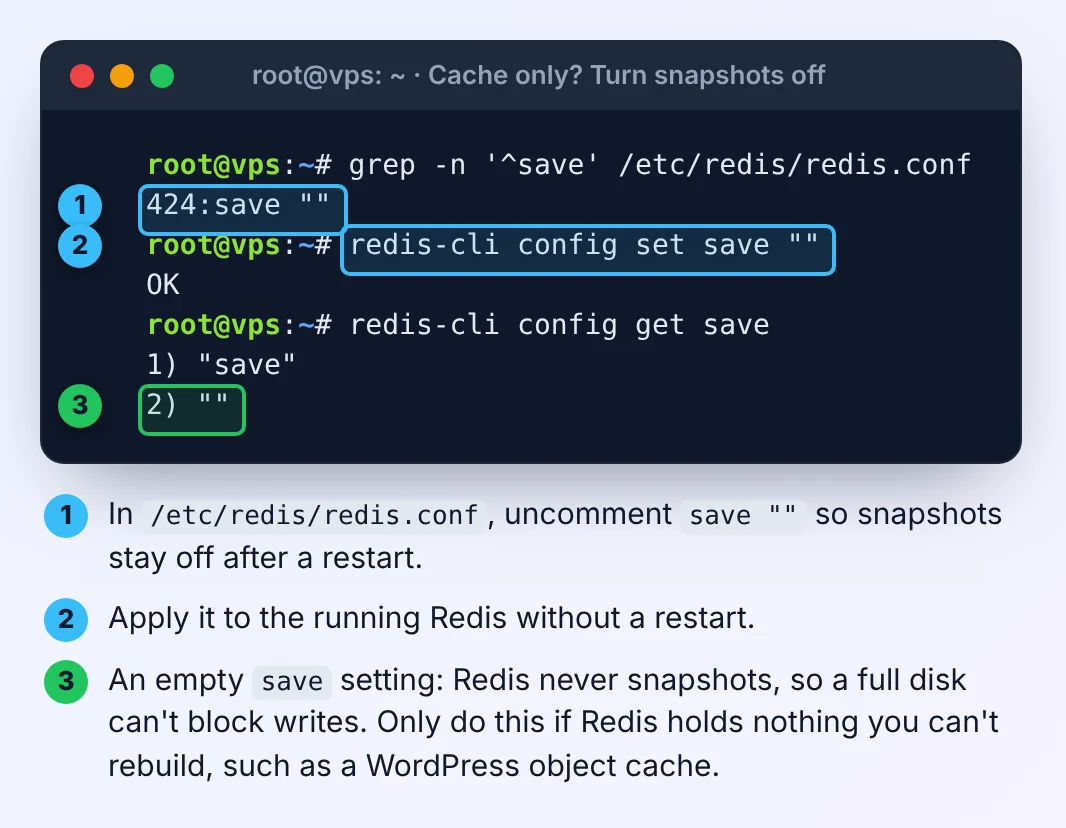
Don't do this if Redis holds anything you can't rebuild. Laravel queues (including Horizon), sessions and rate-limit counters often live in the same Redis. Without snapshots, a restart empties them. In that case keep snapshots on and fix the disk, permissions or memory instead.
What about stop-writes-on-bgsave-error no?
Many answers suggest redis-cli config set stop-writes-on-bgsave-error no. It makes the error disappear, but only because Redis stops telling you that saves are failing. Your data then lives only in memory without you knowing. Use it at most as a stopgap while you free space, and set it back to yes afterwards. If you don't want snapshots, save "" says so honestly.
Stop it happening again
- Keep disk usage well below 100%: log rotation, Docker log limits and off-server backups, as covered in our disk-full guide.
- Check
rdb_last_bgsave_statusin your monitoring, or at least after any restore or move of/var/lib/redis. - Give Redis a memory ceiling it can actually snapshot. Our Data Size Converter helps when
redis-clireports bytes and your plan is sold in GB. - If Redis also stores data you care about, back up
dump.rdboff the server like any other data.
If Redis rejects writes with OOM command not allowed when used memory > 'maxmemory' instead, the problem is its memory limit, not the disk. See fixing Redis OOM command not allowed.
Reproduced on Ubuntu 24.04 with Redis 7.0.15 in November 2026.



Comments 0
Be the first to comment.
Leave a comment